
Is Poppy AI Worth It in 2026? Honest Review, Features, Pricing & Lifetime Deal Explained

Is Poppy AI Worth It in 2026? Honest Review After Extensive Research
Yes—Poppy AI is worth considering if you’re a content creator, marketer, agency, educator, or entrepreneur who works with multiple content sources every day.
Unlike traditional AI writing assistants that require you to start with a blank prompt, Poppy AI lets you build content directly from YouTube videos, PDFs, web pages, voice notes, social media posts, and documents inside a visual workspace.
However, it isn’t the perfect AI tool for everyone.
If you’re only looking for a simple chatbot like ChatGPT, Claude, or Gemini, Poppy AI may feel unnecessary. Its biggest strength lies in organizing information visually and transforming multiple content sources into structured, high-quality content.
In this comprehensive review, we’ll examine exactly what Poppy AI does, who should buy it, its strengths and weaknesses, pricing, and whether the lifetime deal truly delivers long-term value.
What Is Poppy AI?
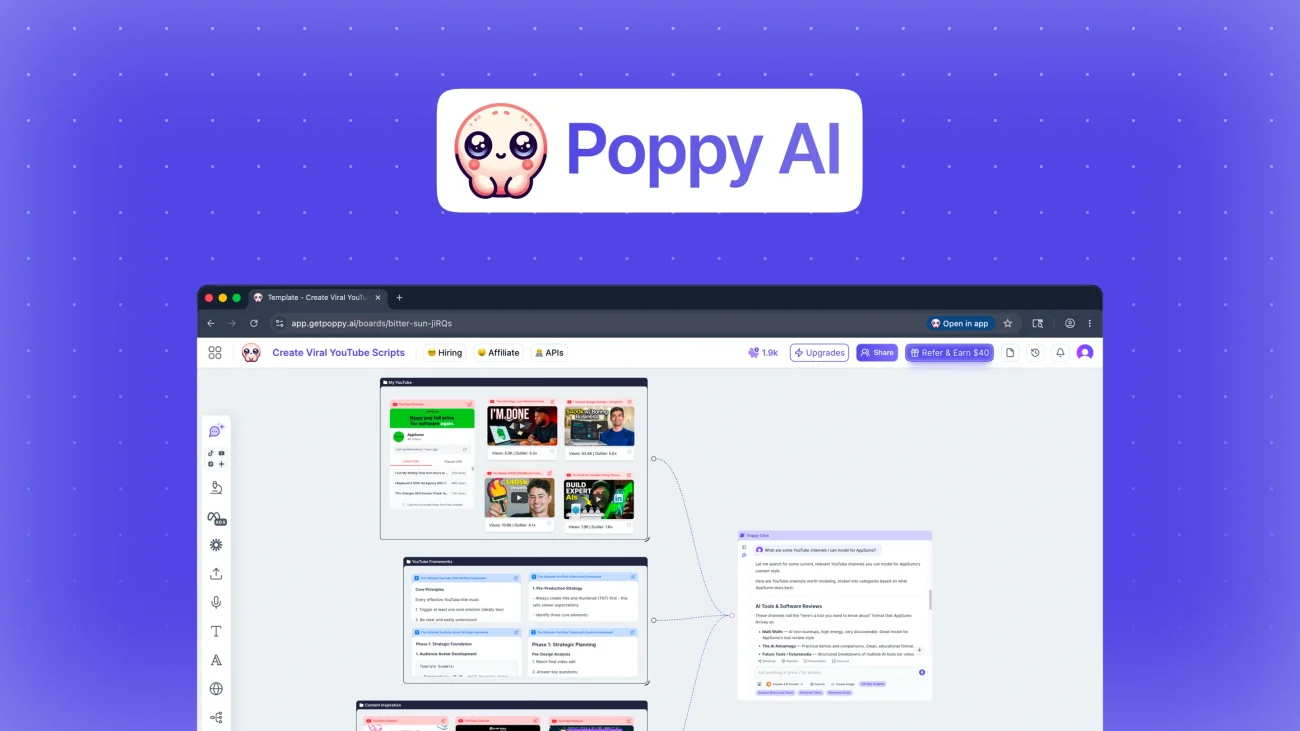
Poppy AI is an AI-powered visual workspace designed to help users transform scattered information into polished, publish-ready content.
Instead of copying information between dozens of browser tabs, documents, and AI chat windows, Poppy AI lets users collect everything inside a single visual canvas.
Imagine researching a YouTube video.
Normally, your workflow looks like this:
- Open YouTube
- Copy transcript
- Paste into ChatGPT
- Open Google Docs
- Copy research
- Find another article
- Paste again
- Repeat…
This constant switching slows down productivity.
Poppy AI eliminates that workflow.
Everything stays inside one collaborative visual board where AI can analyze every connected source simultaneously.
Why Poppy AI Is Different from Traditional AI Writing Tools
Most AI writing platforms work like this:
Prompt → AI → Output
Poppy AI changes the workflow entirely.
Instead of relying on a single prompt, it understands relationships between multiple information sources.
For example, you can combine:
- YouTube videos
- PDFs
- Voice recordings
- Images
- Blog articles
- Web pages
- Notes
- Research documents
The AI then generates content while understanding the context of every connected source.
This dramatically reduces hallucinations and improves factual accuracy because the AI has significantly more context before generating a response.
For creators who spend hours researching before writing, this represents a major productivity improvement.
Who Is Poppy AI Designed For?
Although anyone can use it, Poppy AI delivers the greatest value to professionals who regularly manage large amounts of information.
It is especially useful for:
Content Creators
Whether you publish YouTube videos, newsletters, blogs, podcasts, or LinkedIn posts, Poppy AI simplifies research and content production.
Instead of gathering notes manually, you can build an entire project inside one workspace.
Marketing Agencies
Marketing teams often juggle client briefs, competitor analysis, SEO research, campaign ideas, and creative assets.
Poppy AI centralizes these materials, making collaboration significantly easier.
Social Media Managers
Creating consistent social content requires inspiration from multiple platforms.
Poppy AI allows users to import:
- Instagram posts
- YouTube videos
- TikTok content
- Websites
- PDFs
Then transform them into original content without constantly switching between applications.
Course Creators
Educational creators frequently work with scripts, slides, PDFs, lesson notes, and research papers.
Having everything connected visually helps structure lessons much faster.
Business Owners
Entrepreneurs often wear multiple hats.
Instead of paying separate tools for brainstorming, outlining, research, and writing, Poppy AI combines these workflows into one environment.
Core Features of Poppy AI
Let’s explore what makes this software stand out.
1. Visual AI Workspace
This is Poppy AI’s signature feature.
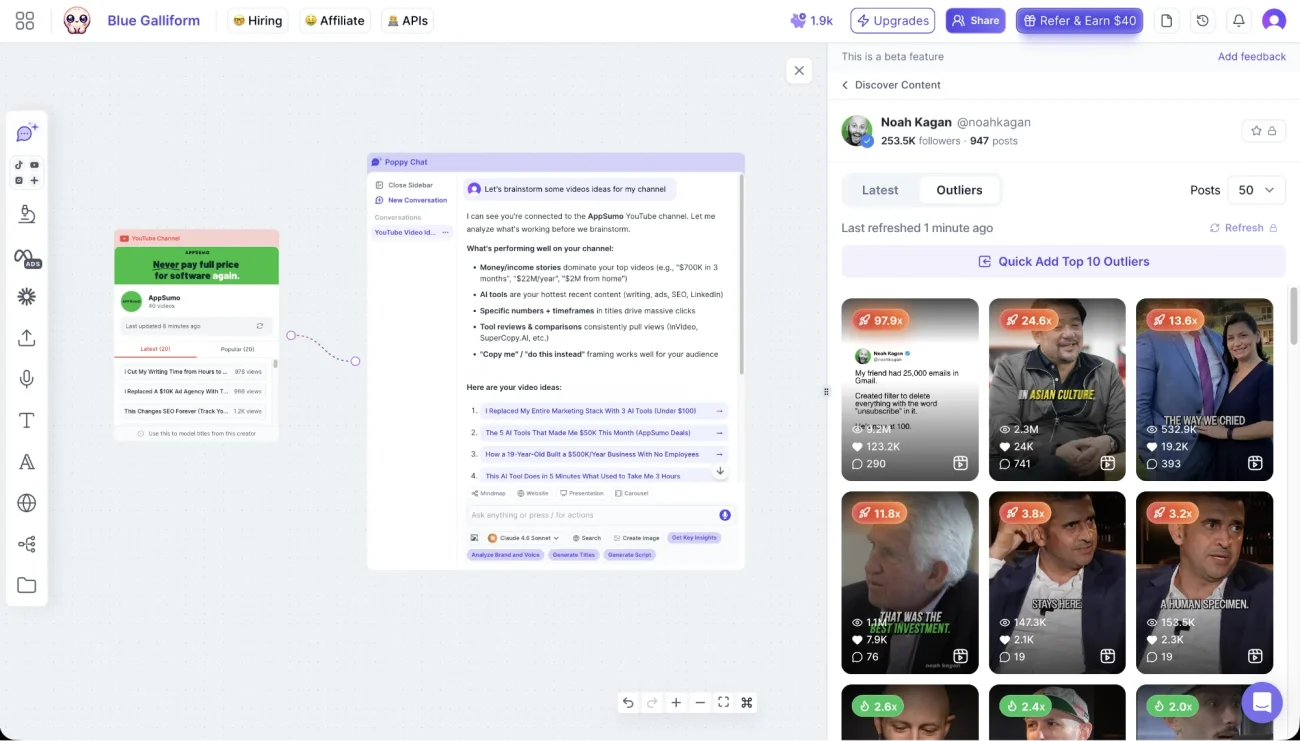
Rather than presenting a traditional document editor, it offers an infinite visual canvas.
You can drag and organize:
- Documents
- Images
- Videos
- Notes
- AI outputs
- Research links
- Mind maps
Everything remains connected.
This makes complex projects much easier to understand than working inside endless folders.
2. Multi-Source AI Understanding
One of the biggest limitations of standard AI chatbots is context.
Poppy AI solves this by allowing multiple connected sources.
For example:
- Five YouTube videos
- Three PDFs
- One research paper
- Two websites
Instead of summarizing them separately, the AI understands them collectively.
This creates far richer outputs.
3. YouTube Content Import
Video research often consumes hours.
Poppy AI lets users import YouTube videos directly into a workspace.
The AI can then:
- summarize videos,
- extract key insights,
- identify recurring themes,
- generate scripts,
- suggest hooks,
- create blog outlines.
For YouTubers and educators, this feature alone can save significant time.
4. AI Writing That Preserves Your Style
Many AI-generated articles sound generic.
Poppy AI aims to reduce that issue by learning from your existing content and maintaining a more consistent writing style.
While no AI perfectly replicates a human voice, this feature helps produce outputs that require less editing before publication.
5. Competitor Research
Competitive analysis becomes much easier when multiple sources are available in one place.
Users can compare:
- blog posts,
- landing pages,
- YouTube channels,
- advertisements,
- social media content.
Instead of reviewing them individually, the AI extracts shared themes, messaging patterns, and opportunities.
This is especially valuable for marketers developing campaigns or SEO strategies.
6. Collaborative Boards
Unlike traditional AI chat interfaces, Poppy AI supports shared workspaces.
Teams can brainstorm together, organize ideas visually, and generate AI-assisted content without constantly sharing files back and forth.
For agencies and distributed teams, this collaborative approach can significantly improve workflow efficiency.
First Impressions
After reviewing its features, user feedback, and workflow, one thing becomes clear:
Poppy AI isn’t trying to replace ChatGPT.
Instead, it’s solving a different problem.
Most AI tools focus on generating answers.
Poppy AI focuses on organizing knowledge before generation.
That distinction makes it particularly valuable for professionals who spend more time researching than actually writing.
Real-World Performance: How Does Poppy AI Actually Work?
Features are one thing—but real-world usability is what separates a good AI tool from a great one.
After evaluating Poppy AI’s workflow, documentation, product positioning, and verified customer experiences, it’s clear that the platform is designed to reduce one of the biggest productivity killers in content creation: context switching.
Traditional AI workflows typically involve moving between multiple applications:
- Google Search
- YouTube
- ChatGPT
- Google Docs
- Notion
- PDF readers
- Browser tabs
- Screenshot tools
Every switch interrupts your focus.
Poppy AI consolidates these resources into a single visual workspace where your research, notes, media, and AI conversations remain connected throughout the project.
For professionals who spend hours gathering information before writing, this creates a noticeably smoother workflow.
The Typical Content Creation Workflow
Let’s compare a traditional workflow with Poppy AI’s approach.
Without Poppy AI
Imagine you’re writing an article about “The Best AI Video Generators.”
Your workflow might look like this:
- Search Google.
- Open ten different blog posts.
- Watch several YouTube reviews.
- Download comparison PDFs.
- Save screenshots.
- Copy important notes.
- Paste everything into ChatGPT.
- Ask ChatGPT to summarize.
- Move the draft into Google Docs.
- Continue editing manually.
By the end, you’ve switched between multiple tools dozens of times.
With Poppy AI
The workflow becomes much simpler:
- Import the YouTube reviews.
- Add PDFs.
- Connect websites.
- Include your own notes.
- Organize everything visually.
- Ask AI to generate a comparison.
Instead of repeatedly explaining context to an AI chatbot, the workspace already contains everything the AI needs.
This is where Poppy AI delivers its biggest productivity advantage.
Content Quality
The quality of AI-generated content depends largely on the quality of the information you provide.
Unlike many AI writing tools that rely on a single prompt, Poppy AI encourages users to build richer context first.
This often leads to content that is:
- More structured
- Better researched
- Less repetitive
- More consistent
- Easier to edit
Rather than generating random paragraphs, the AI produces responses grounded in the materials you’ve imported.
This approach is particularly useful for:
- Long-form blog posts
- YouTube scripts
- Email newsletters
- Marketing campaigns
- Sales copy
- Educational content
AI Models Available
Another advantage of Poppy AI is that it doesn’t lock users into a single language model.
Instead, the platform supports access to leading AI models, allowing users to choose the one that best fits their workflow.
This flexibility is important because different models excel at different tasks.
For example:
- Some models are better at creative writing.
- Others are stronger at reasoning.
- Some produce cleaner summaries.
- Others generate more natural conversations.
Having multiple model options helps future-proof the platform as AI technology continues to evolve.
User Interface
One of the first things you’ll notice about Poppy AI is that it doesn’t look like a typical AI chatbot.
Instead, the interface resembles a digital whiteboard.
This visual approach offers several benefits:
- Easier project organization
- Better idea mapping
- Faster brainstorming
- Clear relationships between research sources
- Reduced information overload
At first, the interface may feel unfamiliar, especially if you’re used to ChatGPT or Claude.
However, after spending some time with it, the visual layout becomes one of its strongest advantages.
Collaboration Features
Modern content creation rarely happens alone.
Marketing agencies, content teams, and creative businesses often require multiple people to contribute to a project.
Poppy AI supports collaborative workspaces where team members can:
- Share research
- Brainstorm ideas
- Build campaigns
- Generate AI content
- Organize assets
This makes it significantly more useful for teams than standard AI chat interfaces.
Learning Curve
Poppy AI isn’t difficult to use, but it does require a different mindset.
If you’re expecting another chatbot, you’ll probably feel confused during your first session.
The platform is designed around visual organization rather than simple conversations.
Fortunately, onboarding resources and tutorials make the transition much easier.
Most users become comfortable after building a few projects.
Performance
Performance depends on the complexity of your workspace.
During typical use, the platform performs well with:
- Research projects
- Script writing
- Content planning
- Blog creation
- Marketing campaigns
Since AI generation relies on cloud processing, occasional delays are normal during high-demand periods, but they are generally comparable to other premium AI platforms.
Poppy AI Pricing
Pricing is always one of the biggest factors when choosing an AI tool.
Instead of offering only monthly subscriptions, Poppy AI has also been available through a lifetime deal.
This is particularly attractive for freelancers, creators, and agencies who want to reduce recurring software expenses.
Different license tiers provide varying levels of:
- AI credits
- Workspace capacity
- Brand support
- Team seats
- API access
- Advanced functionality
Before purchasing, it’s important to estimate your monthly AI usage to choose the appropriate tier.
Buying more capacity than you need can be unnecessary, while choosing a lower tier may limit heavy workflows.
Is the Lifetime Deal Worth Buying?
For many users, this is the biggest question.
Lifetime software deals can provide excellent long-term value—but only if the product continues to improve and remain supported.
Poppy AI appears to be actively developed, with frequent feature updates and an engaged community.
For users who create content regularly, a lifetime license may become significantly cheaper than paying monthly subscription fees over several years.
However, if you only use AI occasionally, a monthly subscription to another platform may offer better value.
Pros
After analyzing the platform, these are its biggest strengths.
Excellent Visual Workspace
The infinite canvas makes research organization much easier than traditional document editors.
Supports Multiple Content Sources
Few AI tools allow users to combine videos, documents, websites, voice notes, and images in one place.
Great for Long-Term Projects
Complex projects become much easier to manage because every resource stays connected.
Collaboration Friendly
Shared workspaces improve teamwork for agencies and marketing departments.
Flexible AI Experience
Access to multiple AI models allows users to select the best option for each task.
Strong Community and Onboarding
One of the most consistently praised aspects of Poppy AI is its helpful onboarding experience and responsive support.
Cons
No software is perfect.
Here are some limitations to consider.
Higher Initial Cost
The lifetime deal requires a larger upfront investment compared to monthly subscriptions.
Learning Curve
The visual workflow takes time to understand.
Users expecting a simple chatbot may initially feel overwhelmed.
Credit Limits
Heavy users should carefully review AI credit allocations before purchasing.
Internet Dependency
Like most cloud-based AI platforms, Poppy AI requires a stable internet connection.
Who Should Buy Poppy AI?
Poppy AI is an excellent choice for:
- Professional bloggers
- Content marketers
- SEO agencies
- YouTubers
- Course creators
- Social media managers
- Marketing agencies
- Business consultants
- Researchers
- Digital entrepreneurs
These users are most likely to benefit from its visual research workflow and multi-source AI capabilities.
Who Should Skip It?
Poppy AI may not be the best investment if you:
- Only need a basic AI chatbot
- Rarely create content
- Don’t work with multiple research sources
- Prefer extremely simple interfaces
- Have a limited software budget
In these cases, a traditional AI assistant may be sufficient.
Poppy AI vs ChatGPT
One of the most common questions potential buyers ask is whether Poppy AI can replace ChatGPT.
The answer depends on how you use AI.
If your primary goal is to ask questions, brainstorm ideas, write emails, or solve coding problems, ChatGPT remains one of the strongest general-purpose AI assistants available.
However, Poppy AI isn’t trying to compete directly with ChatGPT. Instead, it extends the AI workflow by solving a different challenge: organizing knowledge before generation.
| Feature | Poppy AI | ChatGPT |
|---|---|---|
| Visual Workspace | ✅ | ❌ |
| Multi-source Research | ✅ | Limited |
| Import YouTube Videos | ✅ | Limited |
| Import PDFs | ✅ | Yes |
| Team Collaboration | ✅ | Limited |
| Infinite Canvas | ✅ | ❌ |
| General AI Chat | Good | Excellent |
| Coding Assistance | Basic | Excellent |
| Content Planning | Excellent | Very Good |
Winner for research-heavy workflows: Poppy AI
Winner for general AI conversations: ChatGPT
Poppy AI vs Jasper
Jasper has long been recognized as one of the leading AI writing platforms for businesses and marketing teams.
Both platforms help users create content, but their approaches differ significantly.
Jasper focuses on:
- AI writing
- Marketing copy
- Brand voice
- Templates
- SEO content
Poppy AI focuses on:
- Research organization
- Visual brainstorming
- Multi-source content generation
- Knowledge management
- Collaborative workspaces
If your daily work revolves around writing advertisements and marketing copy, Jasper may still be the stronger option.
If your workflow involves extensive research before writing, Poppy AI offers a more comprehensive environment.
Poppy AI vs NotebookLM
NotebookLM has become popular for document analysis and research.
However, the two products target slightly different audiences.
NotebookLM excels at:
- Academic research
- Summarizing PDFs
- Question answering
- Study assistance
Poppy AI goes further by combining:
- Content planning
- AI writing
- Visual organization
- Marketing workflows
- Team collaboration
- Creative project management
For creators and marketers, Poppy AI generally provides a more complete content production workflow.
Best Alternatives to Poppy AI
Although Poppy AI is impressive, it isn’t the only option available.
Here are some excellent alternatives depending on your needs.
ChatGPT
Best for:
- Everyday AI
- Coding
- Writing
- Brainstorming
- Learning
Claude
Best for:
- Long documents
- Natural writing
- Strategic thinking
- Professional editing
NotebookLM
Best for:
- Students
- Researchers
- PDF analysis
- Knowledge retrieval
Jasper
Best for:
- Marketing teams
- Agencies
- Brand consistency
- AI copywriting
Notion AI
Best for:
- Productivity
- Documentation
- Knowledge bases
- Team collaboration
Frequently Asked Questions
Is Poppy AI beginner-friendly?
Yes. While the visual workspace takes a little time to understand, most beginners can become productive after completing the onboarding tutorials.
Does Poppy AI replace ChatGPT?
No.
Poppy AI complements ChatGPT rather than replacing it.
Many professionals actually use both together.
Can Poppy AI summarize YouTube videos?
Yes.
One of its standout features is importing YouTube videos into a visual workspace where the AI can summarize, analyze, and generate new content based on them.
Can teams collaborate inside Poppy AI?
Yes.
Shared visual workspaces make collaboration one of the platform’s strongest features.
Is the lifetime deal worth buying?
If you create content consistently and expect to use AI for years, a lifetime deal can provide excellent long-term value.
Occasional users, however, may find a monthly subscription elsewhere more cost-effective.
Is Poppy AI suitable for SEO content?
Yes.
Its ability to combine multiple research sources helps produce more comprehensive articles.
However, users should still manually optimize headings, metadata, keyword placement, and internal linking for the best SEO performance.
Expert Verdict
Poppy AI is one of the most innovative AI productivity platforms currently available.
Instead of attempting to become another generic chatbot, it solves a genuine workflow problem.
Its visual-first approach allows creators to think, organize, research, and write inside one connected environment.
That alone makes it stand out in an increasingly crowded AI market.
While the learning curve is slightly higher than standard AI chat tools, the productivity gains become noticeable once users adapt to its workflow.
For agencies, YouTubers, marketers, consultants, educators, and researchers, Poppy AI has the potential to save hours every week.
Final Rating
| Category | Rating |
|---|---|
| Features | ⭐⭐⭐⭐⭐ (5/5) |
| Ease of Use | ⭐⭐⭐⭐☆ (4.5/5) |
| User Interface | ⭐⭐⭐⭐⭐ (5/5) |
| Collaboration | ⭐⭐⭐⭐⭐ (5/5) |
| AI Quality | ⭐⭐⭐⭐☆ (4.5/5) |
| Value for Money | ⭐⭐⭐⭐☆ (4.5/5) |
| Overall Score | ⭐ 4.8 / 5 |
Is Poppy AI Worth It?
Yes—especially if your work depends on collecting information from multiple sources before creating content.
Unlike many AI writing assistants that focus solely on generating text, Poppy AI enhances the entire creative process by bringing research, organization, brainstorming, collaboration, and writing into one visual workspace.
It won’t replace every AI tool in your workflow, but it can become the central hub that connects them.
If you’re a serious content creator, marketing professional, educator, or agency owner looking to streamline complex projects, Poppy AI is a compelling investment.
Final Thoughts
Artificial intelligence has changed the way we create content, but productivity isn’t just about generating words faster—it’s about managing information more effectively.
Poppy AI recognizes this reality.
By combining visual thinking with AI-assisted content generation, it offers a workflow that feels more natural than jumping between dozens of disconnected tools.
As the platform continues to evolve, it has the potential to become one of the leading AI workspaces for creators and marketing professionals.
If your current workflow feels fragmented, Poppy AI is well worth exploring.
Conclusion
Poppy AI isn’t simply another AI writing tool—it’s a visual content intelligence platform built for modern creators.
Its combination of research management, AI assistance, and collaborative workspaces makes it particularly valuable for professionals who produce high-quality content on a regular basis.
While no software is perfect, Poppy AI successfully addresses many of the inefficiencies found in traditional AI workflows.
For users seeking a smarter, more organized approach to content creation, it stands out as one of the most promising platforms available today.
FAQ
What is Poppy AI?
Poppy AI is a visual AI workspace that helps users organize research from sources such as YouTube videos, PDFs, websites, voice notes, and documents before generating content with artificial intelligence.
Is Poppy AI better than ChatGPT?
Not necessarily. ChatGPT excels as a general AI assistant, while Poppy AI specializes in research organization, visual collaboration, and multi-source content creation.
Is Poppy AI good for bloggers?
Yes. Bloggers can use Poppy AI to collect research, generate outlines, draft articles, and maintain a more organized content workflow.
Can Poppy AI summarize YouTube videos?
Yes. It can import YouTube videos into its workspace and generate summaries, insights, outlines, and content ideas based on the video.
Is the Poppy AI lifetime deal worth it?
For professionals who create content regularly, the lifetime deal can provide strong long-term value compared to recurring monthly subscriptions.